
Imagine Priya, who runs a small bookkeeping business in Mississauga. For two years, she’s posted blogs whenever she has a free Friday afternoon. She writes whatever comes to mind, hoping to connect with new clients. Her topics range from tax tips to her favourite accounting app to holiday office hours. Like many business owners, Priya posts when she can, but she doesn’t have a strategy for what or when to publish.
But after 23 posts, Priya’s business line isn’t ringing any more often than before, and she hasn’t gained new leads or clients.
Priya’s challenge isn’t writing; it’s planning her content with purpose. An SEO content plan helps by deciding what to publish, when, and in what order. AI tools make writing fast and easy, but knowing what’s worth writing matters most. If Priya follows a plan, she won’t get lost creating random content.
What an SEO Content Plan Is (and What It Isn’t)
An SEO content plan is a document that lists the pages your website needs, the search each page answers, the order you’ll create them, and when each one will go live. Every piece of content connects to a business goal. The content calendar schedules your work, and the roadmap shows your plan over six to twelve months.
What it isn’t:
- A list of blog ideas you thought of in the shower (not unless you can strategically align them to the business).
- A promise to publish three times a week
- A keyword spreadsheet with 4,000 rows and zero decisions
A content strategy helps you make the right choices to attract more clients.
Step 1: Start With What Makes You Money
Before using any keyword tool, write down everything you sell and rank each by profit and how often it brings in new clients. The top two or three are your money pages, and thus drive sales—these are the service or product pages your whole SEO content plan supports. Every future topic should help move readers closer to buying from you.
Here’s Priya’s list:
| Service | Profit | New Clients Last Year |
| Monthly bookkeeping | High | 14 |
| Catch-up bookkeeping | High | 9 |
| Payroll | Medium | 4 |
| Year-end handoff to an accountant | Low | 2 |
Her money pages are monthly bookkeeping, catch-up bookkeeping and payroll. The year-end handoff stays on the site, but it won’t get its own content cluster.
Next to each money page, write down who buys it and what state they’re in when they search. Priya’s catch-up clients are usually owners who are months behind and panicking before a tax deadline. That one detail will shape the tone, headlines, and call to action on every page in that cluster.
Step 2: Collect Your Customers’ Questions First
The best SEO content plan starts with your inbox, not a keyword tool. Customer emails, first calls, quote requests, and reviews show the real words buyers use and the concerns that might stop them from hiring you. Collect 20 to 30 real questions before using any keyword tool. These questions lead to content that competitors and AI can’t easily copy.
Where to look:
- Your sent folder. Search for question marks in emails you’ve answered.
- First-call notes. Write down the questions you answer on every discovery call, word for word.
- Reviews. Read yours and your competitors’. Complaints are content ideas in disguise.
- Quotes that didn’t close. Ask yourself what kept each prospect from saying yes.
Priya’s list started like this:
- “How far behind is too far behind?”
- “Can you fix books someone else messed up?”
- “Do I need to charge HST yet?”
- “What does monthly bookkeeping cost for a business my size?”
Why start here? Google’s own guidance on optimizing for AI search says unique, useful content will likely influence your visibility over time more than any other tactic, and it singles out first-hand experience as the kind of perspective that stands out. A question you’ve answered 40 times on the phone is first-hand material. A rewrite of someone else’s “10 bookkeeping tips” post is not.
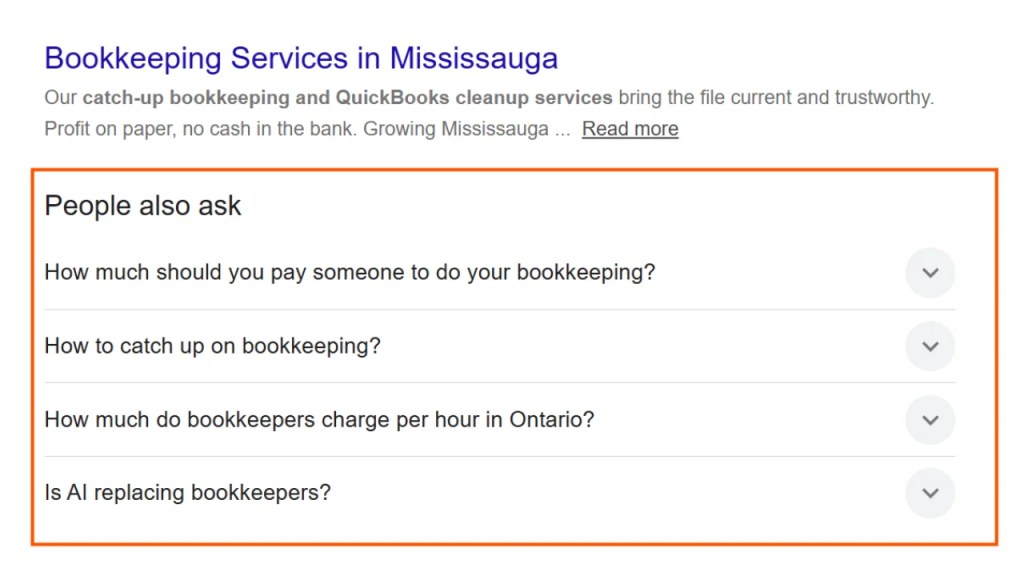
Next, search the questions you’ve collected on Google and Bing. Check the People Also Ask section on the results page to find even more questions you can answer in your content.
Step 3: Build Your Keyword List With Free Tools
You can build a good keyword list without paying for software. If your website already gets some traffic, Google Search Console is a great place to start. It shows which searches bring people to your site and can help you spot quick wins. If you’re starting or have little traffic, use Google autocomplete and the People Also Ask boxes to see what buyers are searching for. Bing Webmaster Tools also has a free, beginner-friendly keyword research tool. Paid tools like Semrush and Ahrefs add more data and speed, but small businesses can start without them.
Your free toolkit:
- Google Search Console. Open the Performance report, sort queries by impressions, and look for searches where your site already appears on page two. These are your quickest wins, but this only works if you’re already getting enough impressions.
- Google autocomplete. Type your service, then add words like “cost,” “vs,” “how to,” and “near me.” Write down every suggestion that matches what you sell, or the problem you want to solve.
- People Also Ask. Click one question, and more appear. Copy the ones your customers have asked you too.
- Bing Webmaster Tools. This is similar to Google Search Console and arguably better in some ways. Its keyword research tool is free and shows rough Bing search volumes.
- Google Trends. Check whether interest in a service spikes in certain months so that you can publish before the rush.
- Moz Keyword Explorer. A free Moz account gives you a limited number of keyword searches each month, with volume ranges and related questions. That’s enough to check your most important money-page searches without paying for a subscription.
The Free Content Gap Analysis
A content gap analysis means finding topics your search competitors cover that you don’t. Here’s the no-cost version:
- Search each money-page service plus your city, such as “catch-up bookkeeping Mississauga.”
- Note the top three results that aren’t directories or sponsored. These are your search competitors, which may differ from the businesses you compete with for clients.
- Open their websites and list the topics they cover that you don’t. Also check sponsored pages to see whether they include useful blog content.
- Add those gaps to your sheet.
Priya found a competitor ranking with a page comparing bookkeepers and accountants. She had nothing on the subject, even though clients asked her about it every month.
Step 4: Check What Google Shows for Each Search
A keyword shows what people type, but the results page shows what Google thinks they want. Search each important keyword yourself and note what appears at the top—like an AI Overview, a map of local businesses, videos, or regular links. This helps you decide if a search needs its own page, should be part of a bigger page, or can be left out.
Pew Research Center tracked the Google searches of 900 U.S. adults and found they clicked a traditional result in 8% of visits when an AI summary appeared, compared with 15% when none did. They clicked a link inside the summary itself in about 1% of visits. Pew also found that longer, question-style searches were more likely to produce a summary.
So, see AI Overviews as a shift in your target, not a reason to stop. Use this table to help you decide what to do next:
| What You See | What It Means | What to Do |
| AI Overview on a basic definition | Few clicks left for anyone | Answer it inside a larger page instead of writing a standalone post |
| AI Overview on a detailed, specific question | AI is pulling from sources, so being cited matters | Build a page with first-hand detail worth citing |
| Map of local businesses | People want someone nearby | Point the search to your service page and Google Business Profile |
| Videos | People want to watch, not read | Add a short video to the page |
| Plain links, no AI Overview | Clicks still flow | Strong candidate for a dedicated page |
Add a column called “SERP notes” to your sheet and record what you saw for each search.
Priya’s results (for example):
- “What is bookkeeping” showed an AI Overview with a basic definition. She dropped it.
- “Catch-up bookkeeping Mississauga” showed a local map and plain links. She made it a priority for her service page.
- “Bookkeeper vs accountant Ontario” showed an AI Overview, but the question was specific enough that her real fee comparison could earn a citation. She kept it.
Step 5: Group Keywords Into Topics, Not Pages
Search engines and AI tools understand that terms like “bookkeeper cost,” “bookkeeping prices,” and “how much is a bookkeeper” all mean the same thing. That means you only need one page for each topic.
Build your SEO content plan around clusters. Group your keywords, give each cluster a main page, and connect related pages with internal links. This way, you’ll have a few strong pages instead of many weak ones. Over time, this depth helps search engines see you as an authority.
Here’s one of Priya’s clusters:
Cluster: Catch-Up Bookkeeping
- Main page: Catch-up bookkeeping service page (a money page)
- Supporting article: How Far Behind Is Too Far Behind on Your Books?
- Supporting article: What Happens When a Small Business Files Late With the CRA
- Supporting article: How to Fix Books a Previous Bookkeeper Got Wrong
Each supporting article links up to the service page. The service page links back down to each article.
Let a Free AI Tool Do the First Sort
Keyword clustering by hand gets tedious past 50 terms. Paste your list into ChatGPT, Claude or Gemini with a prompt like this:
Here is a list of keywords for a bookkeeping business in Mississauga. Group them into topics where one page could answer every keyword in the group. Name each group. Flag which groups match these services: monthly bookkeeping, catch-up bookkeeping, payroll. List any keyword that doesn't fit a group separately.
Don’t just accept the AI’s groups without reviewing them. AI sorts keywords by similar words, but you know what your customers really want.
For example, it might put “payroll software” and “payroll services” together because both include “payroll.” Those are different people. Someone searching for software wants to do payroll themselves. Someone searching for services wants to hire a company like Priya’s. Put them in separate groups so each one gets a page that answers its question.
Don’t Build a Page for Every Variation
AI writing tools can make it tempting to publish dozens of nearly identical pages for terms like “bookkeeper Mississauga,” “bookkeeping Mississauga,” and “Mississauga bookkeeping services.” Avoid doing this. Google’s spam policies see mass-producing similar pages to boost rankings as content abuse, no matter who writes them.
Almost identical pages also compete with each other. If two pages answer the same search, Google has to pick one, and both may rank lower than a single strong page. To avoid this, give each topic one row in your planning spreadsheet and treat each row as one page. If two rows target the same search, combine them before you start writing.
Step 6: Score Your List and Put Foundations First
Rank your topics by business value, not just search volume. Score each topic from 1 to 3 on three things: how close it is to a sale, how ready the searcher is to buy, and how easily you can write it well. Add up the scores and start with the highest ones, focusing on service and trust pages before blog posts.
The scoring guide:
| Factor | Score 1 | Score 2 | Score 3 |
| Business value | Loosely related | Supports a money page | Is a money page |
| Buyer intent | Learning the basics | Comparing options | Ready to hire or buy |
| Ease of writing | Needs research or interviews | Needs some research | You could write it today |
Priya’s top five:
| Topic | Value | Intent | Ease | Total |
| Catch-up bookkeeping service page | 3 | 3 | 3 | 9 |
| Monthly bookkeeping service page | 3 | 3 | 3 | 9 |
| Bookkeeper vs accountant in Ontario | 2 | 2 | 3 | 7 |
| How far behind is too far behind | 2 | 2 | 3 | 7 |
| What is double-entry bookkeeping | 1 | 1 | 2 | 4 |
Then build in this order:
- Money pages. Your service or product pages.
- Trust pages. About, pricing and client examples.
- Supporting articles. Highest scores first.
- Everything else. Only if time allows.
So, Is Blogging Still Worth It?
Yes, blogging is still worth it, but its role has changed. Articles that answer specific buyer questions help send readers and links to your service pages, and they give AI tools real examples to cite. Posts aimed at broad, general traffic are the ones losing clicks to AI summaries.
Priya’s holiday-hours post can stay up. It just doesn’t count toward the plan.
Step 7: Turn the Plan Into a Content Calendar
Your content calendar should fit the time you actually have, not the time you wish you had. Be honest about your weekly hours, figure out how long one good piece takes, and plan from there. For most small business owners, two strong pieces a month are better than eight rushed ones. Even one well-written article a month is real progress. Consistency, at any pace, beats burnout or never publishing. Make sure your calendar also includes time to update older pages.
The math for a typical owner:
- One well-researched article takes about 6 to 8 hours to draft, edit, illustrate and publish.
- Four hours a week gives you about 16 hours a month.
- That’s two new pieces, with a few hours left over for one refresh.
A monthly rhythm that works:
- Week 1: Write piece one.
- Week 2: Publish it, then add links to it from two or three older pages.
- Week 3: Write piece two.
- Week 4: Refresh one older page and review your numbers.
Your SEO content plan lives in one spreadsheet. Set it up with these columns:
| Column | What Goes In It |
| Topic | The page’s main subject |
| Cluster | The group it belongs to |
| Main search | The one search it targets |
| Search intent | Learning, comparing or buying |
| Page type | Service page, article, guide or comparison |
| SERP notes | AI Overview, local map, video or plain links |
| Score | The total from Step 6 |
| Status | Idea, briefed, drafting or live |
| Publish date | The target date |
| Refresh date | When you’ll review it next |
Schedule Refreshes the Day You Publish
When a page goes live, set its first review date six months out. Service pages get reviewed sooner, whenever your prices or offers change.
Refresh a page when:
- A price, rule, or deadline changes.
- Customers start asking a new question about the topic.
- Search Console shows the page losing impressions for its main search.
A real refresh means adding new facts and better answers. Just changing the date doesn’t count.
Step 8: Write a Page Brief Before Every Piece
A content brief is a one-page set of instructions for a single piece of content. It names the search the page targets, the question the reader brings, the answer the page opens with and the details only your business can add. The brief is where your SEO content plan meets the page. A good brief works whether you write the piece yourself, hand it to a freelancer or ask an AI tool for a first draft.
Copy this template:
- Main search:
- Reader: Who they are and what’s worrying them
- Opening answer: Two or three sentences that answer the question directly
- Details only we can add: Real prices, client examples, photos, numbers from our own work.
- Sections: The H2 headings, in order
- Internal links: Up to the money page and across to one or two related pages
- Call to action: The one thing the reader should do next
The “details only we can add” section matters most. It’s what makes your page unique, instead of sounding like everyone else’s. If you leave it blank, an AI draft will fill it with generic content.
Before you publish, run the draft through our on-page SEO checklist to catch missing titles, weak headings and forgotten links.
Review the Plan Every Quarter
Every three months, look at what the plan produced. Check which pages gained impressions in Search Console, which appear in its generative AI performance report, and which bring in calls, quote requests, or sales. Then add new topics, merge overlapping pages, and cut topics that don’t earn their place.
Your quarterly checklist:
- Search Console Performance report. Which searches gained or lost impressions?
- Generative AI performance report. Which pages appear in Google’s AI features?
- Leads by page. Count form fills, calls and bookings tied to each page.
- A quick AI check. Ask ChatGPT, Gemini and Perplexity your top three customer questions and note whether your business comes up.
- New questions. Add anything customers asked in the last 90 days, then repeat Step 2.
The first quarter usually doesn’t bring big changes. You’re looking for steady progress, not dramatic results. An SEO content plan is a living document, and each review helps you improve for the next three months.
When to DIY vs. When to Hire a Content Strategist
Building your own SEO content plan works well if you sell one or two services in one city and have a few hours each week. But if you offer several services or locations, or compete with national brands, sorting hundreds of keywords and checking every results page can become a part-time job with lots of room for mistakes. A specialist with paid tools can do in days what might take you a month.
Not sure if it’s time to get help? Use this checklist. Consider hiring a content strategist or specialist if:
- You offer three or more services or cover more than one city or region.
- You target national or highly competitive search terms.
- You feel stuck sorting hundreds of keywords or mapping out topics.
- Your current content is not bringing in leads after several months.
- You don’t have the time or energy to review competitor content and search results regularly.
- You want to move faster or avoid common pitfalls.
If any of these apply, working with a specialist can save you time, help you avoid mistakes, and get results faster.
Start With One Topic This Month
Priya didn’t need 23 more posts. She needed one well-done cluster: her catch-up bookkeeping page rewritten to answer the questions worried owners ask, plus three supporting articles that link to it. At four hours a week, that’s about two months of work.
Do the same. Pick your highest-scoring money page, build its cluster, and only then move on to the next one.
A content roadmap you follow for twelve weeks is better than a perfect plan you never use.


One Comment