
If you want proof that blogging and content marketing can drive sales, look at a small pool company in rural Virginia in 2008.
After the housing crash, people stopped buying backyard pools. River Pools and Spas faced the same struggles as other installers. Then, co-owner Marcus Sheridan tried something most in his industry wouldn’t have considered.
He began answering every customer question on the company blog, even the ones most pool companies avoided, like “how much does a fibreglass pool cost?”
After the recession, River Pools grew, getting more traffic, leads, and sales than ever. Its blog became a top resource for pool buyers across North America.
Sheridan’s posts helped people right when they were ready to buy.
This approach still works today, even with AI search. Now, AI summaries answer simple questions as soon as customers begin shopping.
Blogging for Your Business vs. Blogging for Income
If you search for “blogging to increase sales,” you’ll see that many results focus on making money from the blog itself, like ads, affiliate links, or sponsored posts. That’s a different business model. Those bloggers are selling attention.
But you’re selling something different: products and services like pool installations, bookkeeping, or wedding cakes.
Your blog’s job is to help the right person get one step closer to buying from you.
- Who reads your blog is more important than how many people read it. A post seen by 30 homeowners with a broken furnace is better than one read by 3,000 people who will never hire an HVAC company.
- Customer Conversations measure success. Calls, quote requests, and bookings are what really count.
- Page views are like a weather report: interesting and sometimes useful, but they’re never the main goal.
How Blogging Drives Sales
A business blog helps you make sales in four simple ways:
- It brings in people who want to buy,
- answers common questions before someone calls,
- gives AI search tools reliable info about your business,
- and keeps working for you after hours when you share posts with people who are still thinking.
Many owners focus only on getting more buyers, so their blogs don’t do as well as they could.
Blogs Attract Buyers Who Are Ready to Spend
Some searches are just out of curiosity. Others are from people who are ready to spend money.
For example, “Why does my furnace make a clicking noise?” is a curious search. “Furnace replacement cost Mississauga” comes from a buyer with a budget and a deadline. Posts aimed at buyer-intent searches may get fewer readers but attract more customers.
A search usually has buyer intent when it:
- includes a price, cost or quote
- compares two options
- names a city or neighbourhood
- asks how to choose
Business Blog Answers Objections Before the Customer Enquires
Every service has a few reasons why people hesitate. It might seem too expensive, the timing might be wrong, they might worry about being upsold, or they might not think you’re qualified.
Write at least one post for each concern, with clear information that addresses it.
River Pools’ price post worked because it answered buyers’ biggest question before they called. When people are already convinced, sales happen faster and feel friendlier.
Your Answers Get Your Business in AI Snippets
Someone asks ChatGPT, Perplexity or Google’s AI Mode which roofing material holds up best through an Ontario winter. The answer gets assembled from pages those tools found and trusted.
If your post explains the trade-offs clearly, with details only an experienced roofer would know, your business might get mentioned in the answer. Even if the reader doesn’t click, they may remember your name when they need help.
Make it easy for AI tools to find and trust your site by following basic AI search optimization. Answer common questions clearly, use headings to organize your content, keep your information up to date, and include key facts in lists or tables when it helps. Add descriptive titles and meta descriptions, keep your formatting simple, and update old posts as needed. These steps help both your readers and the AI tools that summarize search results.
The Business Blog Sells for You After Hours
This method costs nothing and works even if your blog doesn’t get much traffic.
After a quote visit, text the homeowner a link: “Here’s the post I mentioned about why we replace the shut-off valve at the same time.” The post does the explaining while you drive to the next job.
When you use your blog this way, it becomes a library of answers you’d give if you had unlimited time. Even a post with just 40 visits a month can close deals if the right people read it.
How AI Search Changed Business Blogging
Now, simple questions are answered right on the search results page. A 2025 Pew Research Center study found that Google users clicked a regular search result only 8% of the time when an AI summary appeared, compared to 15% when there was no summary. For small business blogs, generic how-to posts lose most of their clicks, but posts that help people make buying decisions are still valuable.
Imagine someone asking River Pools’ price question today. An AI summary might give a national price range, but the buyer still wants a real number for their own yard, soil, and town. They will click on whoever gives the most honest and specific answer.
How many people end up on your website depends on whether AI can answer their question right away or not:
| The search | Can an AI summary settle it? | Who still clicks |
| “What is a sump pump?” | Yes | Almost nobody |
| “Sump pump installation cost in Brampton” | Partly. It gives a range. | Buyers who want your price |
| “Battery backup or water-powered sump pump for a finished basement?” | Partly | People about to spend four figures |
| “Is [your company] any good?” | No | Anyone close to hiring you |
Fewer people click, but those who do are further along in the process and ready to talk.
A small audience of buyers is better than a large group of browsers. Your bank account will agree.
Which Blog Posts Drive Sales
A sales-driving blog is filled with posts only your business could write. Google’s guidance on AI search separates commodity content, which anyone could repeat, from unique content based on first-hand experience. For example, a “10 Spring Cleaning Tips” post from a cleaning company is commodity content, and an AI summary will answer it before anyone visits your site.
Five post types consistently move buyers:
- Pricing explained. What makes your price go up or down, with honest ranges. Owners often dread writing this post. Buyers search for it all the time, as River Pools proved.
- Comparisons. Option A versus option B, including when the cheaper option is the right choice. Honesty builds more trust than a page of testimonials.
- How to choose. “How to choose a bookkeeper for a five-person company” catches people in the middle of a decision.
- Problem-and-fix stories. A real job, what went wrong and how you fixed it, with photos from your phone.
- Customer stories. One client, one problem, one result, told in their words wherever possible.
Posts that rarely lead to sales include rewritten industry news, generic tip lists, and “Happy Holidays from the Team.” These don’t hurt, but they aren’t worth a spot in a busy owner’s schedule.
Before publishing your next post, make sure it meets good content standards and cut out anything that feels like filler.
How to Turn Blog Readers Into Leads
A reader becomes a lead when each post offers a next step that matches how ready they are to buy. Someone comparing options isn’t ready for a booking form, but someone reading your pricing post might be. Mismatched calls to action are the main reason blog visitors leave without reaching out. Fixing this is the quickest way to turn blog traffic into leads.
Match the ask to where the reader sits in the buyer’s journey:
| Post type | What the reader is thinking | The next step to offer |
| How-to or problem post | “I’m still figuring this out.” | A one-page checklist, or your related comparison post |
| Comparison or how-to-choose | “Which option fits me?” | Your service page, with a line on who it suits best |
| Pricing post or customer story | “Can I afford this, and can I trust them?” | A quote form or booking link |
Three rules for blog calls to action

- Use only one call to action per post. Otherwise, if you add three or more buttons, it turns into a menu, and menus slow people down and cause decision fatigue.
- Link each post to its service page within the main text, where readers will notice it, instead of hiding it in the footer.
- Write your call to action like it’s the next line in a conversation. For example, “Want a firm number for your basement? Send us three photos, and we’ll quote it within a day” works much better than just saying “Contact Us.”
You don’t need marketing automation for this. A quote form, a downloadable checklist with an email field, or a Calendly booking link is enough for most small businesses using blogs to get leads.
Write Blog Posts the Way You Talk to Customers
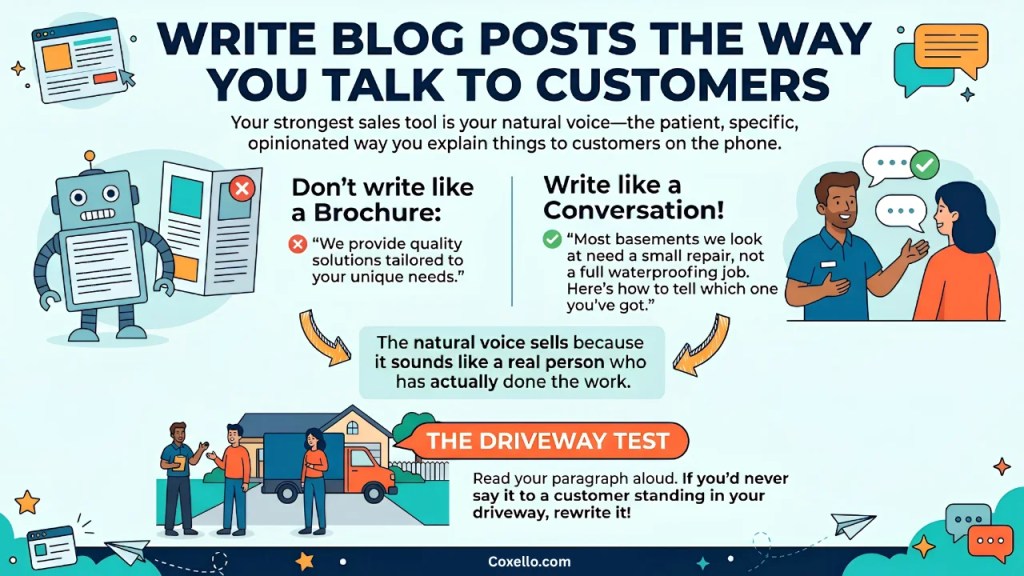
Your best sales tool is your own voice—the patient, specific, and sometimes opinionated way you explain things on the phone. Most owners lose that voice when they start writing and end up sounding like a brochure.
Compare these two lines:
- Brochure: “We provide quality solutions tailored to your unique needs.”
- Conversation: “Most basements we look at need a small repair, not a full waterproofing job. Here’s how to tell which one you’ve got.”
The second example works because it sounds like someone who has actually done the job. Here’s a quick test: read a paragraph out loud. If you wouldn’t say it to a customer in person, rewrite it.
Keep your real voice in your writing by using a few conversational habits that make your posts sound like you.
How Often Should a Business Blog?
One strong post a month is better than four weak ones. Twelve posts a year that answer real customer questions will help your sales more than fifty-two filler posts written to meet a quota. Consistency matters, but only if each post is worth reading.
You already have a year’s worth of topics. They’re hiding in four places:
- Your sent folder. Any email where you explained something in more than three paragraphs is a first draft.
- Quote requests. The questions people ask right before they commit.
- Your phone. For one week, jot down every question a customer asks you. Expect at least a dozen.
- Old proposals. The “why we recommend this” section is a comparison post waiting to happen.
If you want to pick a blog topic, try this simple process:
- Scan your sent emails or list of recent customer questions. Pick the question you get most often from people before they buy. For example: “How much does it cost to upgrade my electrical panel?”
- Write down exactly how you would answer it if you were talking to a customer. Include the details, the ballpark numbers, and the honest pros and cons you would share in person.
- Use your answer as the outline. Add a short intro that frames the question, your main answer with clear steps or facts, and a clear next step, such as inviting the reader to contact you for a quote or more details.
- Give the post a direct title, like “Electrical Panel Upgrades: What They Cost and When You Need One.”
This method turns your everyday explanations into helpful, buyer-focused content. It also takes less time than starting from scratch or trying to write like a marketer.
Plan your topics once a quarter and connect each one to a service with a simple blog strategy. Then, write one post each month.
How to Track Sales From Your Blog
You don’t need a CRM or a data analyst to track blog sales. Four simple habits can give your small business a clear picture of your content marketing ROI. Ask every new customer how they found you, mark blog-driven form submissions in Google Analytics, check which searches bring people to each post, and log posts you send to prospects. In six months, you’ll see which posts help close deals.
Getting started is easier than it sounds. If you have a website, you can set up Google Analytics in a few minutes by creating a free account at analytics.google.com and following the step-by-step instructions to add a tracking code. Google’s beginner guide will walk you through the basics. For Google Search Console, go to search.google.com/search-console and follow the prompts to verify your site. Both tools have plenty of beginner resources, and most website platforms like WordPress offer easy guides too. If you get stuck, search “how to set up Google Analytics on [your platform]” for a walkthrough.
- Ask. Add “How did you hear about us?” to your quote form, with “Read an article on your site” as one of the options. Low-tech and surprisingly accurate.
- Mark it in GA4. Set quote-form submissions as a key event in Google Analytics, then open the Landing pages report to see which posts those visitors started on.
- Check Search Console. Filter the Performance report by a post’s URL to see the searches bringing readers in. Buyer-intent searches in that list mean the post is pulling the right crowd.
- Log your sends. A simple spreadsheet works: date, prospect, post sent, outcome.
Once a quarter, ask one question: which posts were involved in jobs we won? Then write more like those.
When to DIY vs. When to Hire a Blog Writer
Writing your own posts works if you can set aside a few hours each month for one good article. Doing it yourself stops making sense when posts keep falling behind client work, or when your drafts explain the service well but never ask for the sale. A writer who interviews you for 30 minutes can turn your knowledge into buyer-focused posts faster than you could on your own.
If you want to find a writer, start by asking business contacts for referrals or searching on freelance platforms like Upwork, Fiverr, or specialized writing job boards. When you talk to a potential writer, ask for samples of business blog posts they’ve written and see if their style matches how you talk to your customers.
Explain the type of customers you serve and the questions you get, and make sure they’re comfortable interviewing you to get details only you would know. A short interview should focus on bringing out your real voice and experience, not just filling the page.
Start With the Questions Your Customers Already Ask
Marcus Sheridan didn’t out-advertise his competitors in 2008. He answered more questions than they did.
Your version of his pool price post is probably already in your inbox. It’s the question a customer asked you this week, the one you’ve explained many times on the phone.
Write down your answer, finish with a clear next step, and post it for the next person who asks.


One Comment