
Picture Marcus, an electrician in Brampton who spent a week reading about AI SEO before building his first website.
He went through four guides. One suggested making an llms.txt file. Another recommended breaking every page into small answer sections. A third advised mentioning his business name in Reddit threads. The fourth, from Google, said he could skip all of that.
So, like many business owners faced with conflicting advice, Marcus just closed his laptop.
Many people think AI search needs a whole new set of rules, with hidden files and special coding. But Google sees things differently. According to its guide, optimizing for AI search is still just SEO in Google’s eyes.
AI search doesn’t replace your website’s main entrance. Instead, it adds more ways for people to find you, and most use the same methods as before.
With AI SEO, the main difference is the order of the steps. Here are seven steps, from choosing a platform to reviewing your work in the first week, along with some common advice you can skip. If you need a reminder about basic SEO, start here first.
What AI SEO Means, and What Google Calls It
AI SEO means making your website easy for AI-powered search tools to find, understand, and reference. These tools include Google’s AI Overviews and AI Mode, ChatGPT, Perplexity, Gemini, and Microsoft Copilot. You might also hear this called generative engine optimization (GEO), answer engine optimization (AEO), or large language model optimization (LLMO). No matter the name, it’s the same job. Google treats all of it as SEO, and this guide will use whichever term fits best.
Here’s a simple explanation of how AI search works.

When someone asks a question, the AI doesn’t answer from memory alone. It runs searches first, often several at once. Google calls this query fan-out. From its own example, a question about fixing a weedy lawn might trigger separate searches for herbicides, chemical-free removal and prevention.
Next, the AI reviews the pages it found and creates an answer, including links to its sources. This process is called retrieval-augmented generation, or “grounding.”
The main point is:
- If your page isn’t in the search index, it won’t show up in AI answers.
- Every step in this guide is designed to help your site get into the index and make it valuable enough to be quoted.
Step 1: Choose a Platform That Shows Its Words to Machines
Your first AI SEO choice comes before you write anything: picking your website builder. Some builders send visitors a complete page, with your text included in the code. Others send a mostly empty page and use JavaScript to add the words after the page loads.
Google can read JavaScript if nothing blocks it, but it admits that SEO is trickier on sites that rely heavily on JavaScript.
Not every AI crawler will wait for your content to load. If your builder doesn’t show your content in the page source or hides it behind scripts, you have some choices:
- Ask your developer about server-side rendering (where the server creates the full page before sending it out),
- See if your platform has a setting to make pages more search-friendly,
- Think about switching to a builder that creates static HTML pages by default.
Static HTML means your words and content are included directly in the page code, so both people and search engines can see them right away. It’s much easier to start with a compatible builder than to fix problems after your site is live.
You can test any site in 30 seconds:
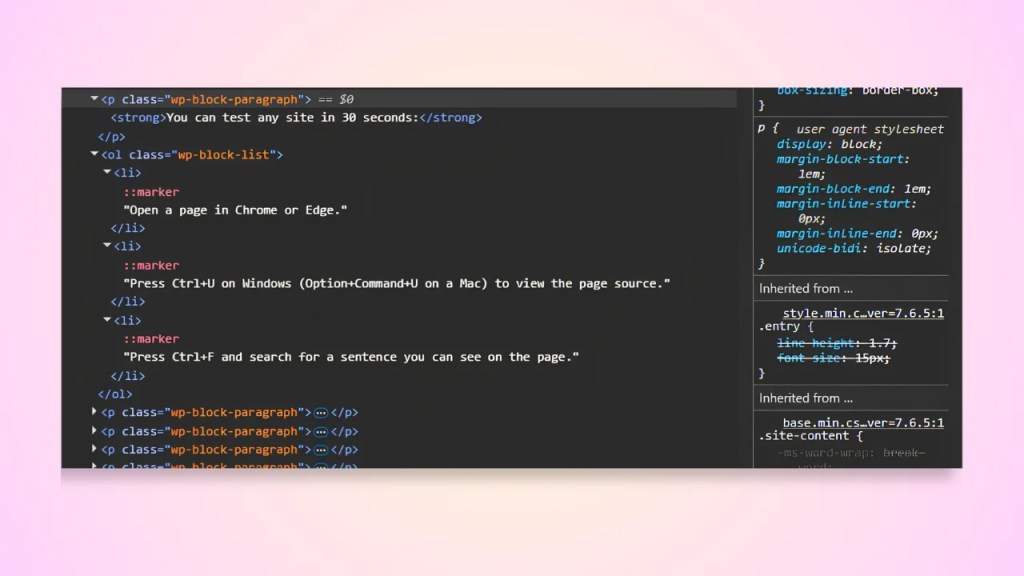
- Open a page in Chrome or Edge.
- Press Ctrl+U on Windows (Option+Command+U on a Mac) to view the page source.
- Press Ctrl+F and search for a sentence you can see on the page.
Found it? Good. If the source is a wall of script tags and your words are missing, ask your developer about server-side rendering before launch, not after.
Mainstream builders like WordPress, Squarespace and Shopify generally pass this test. Custom-built apps are where the trouble tends to hide.
When picking templates, choose ones with real headings and clear button labels. For example, “Book a Panel Inspection” is better than “Click Here.”
Clear headings and labels help both customers and search engines find important information, making your site more accessible and trustworthy. Screen readers rely on this structure, and Google points out that AI agents booking appointments look for the same cues.
Step 2: Open Your Door to AI Crawlers on Your Website
Every AI search tool sends its own crawler, a bot that reads web pages and brings them back to the tool’s index. Before a crawler touches your site, it checks a small text file called robots.txt, found at yourdomain.com/robots.txt. If that file tells a bot to stay out, the bot stays out, and your business can’t appear in that tool’s answers. AI crawlers take five minutes to check robots.txt and can undo months of good work if you get it wrong.
Here are the crawlers worth knowing:
| Crawler | Company | What It Does |
| Googlebot | Google Search, AI Overviews and AI Mode | |
| Bingbot | Microsoft | Bing search, which Copilot draws on |
| OAI-SearchBot | OpenAI | ChatGPT’s search results |
| GPTBot | OpenAI | Training future OpenAI models |
| PerplexityBot | Perplexity | Perplexity’s search index |
| Claude-SearchBot | Anthropic | Claude’s search results |
| ClaudeBot | Anthropic | Training future Claude models |
As a general rule, let search crawlers access your site if you want to appear in AI answers. For training crawlers like GPTBot and ClaudeBot, it’s your choice. Blocking them stops your content from being used in future AI training, but it won’t remove you from current search results.
You may also see Google-Extended in robots.txt advice. It isn’t a crawler. It’s a setting that controls whether Google can use your content to train and ground Gemini, and Google says it doesn’t affect your inclusion or ranking in Google Search.
There’s another possible blocker. Even if your robots.txt file is set up correctly, your site might still be blocked at a higher level. In July 2025, Cloudflare began blocking known AI crawlers by default for new domains. Some security plugins and hosting firewalls do the same.
Before launch, check both layers:
- Robots.txt: Visit yourdomain.com/robots.txt and look for “Disallow: /” under any bot you want to allow. A missing or empty file allows everything.
- Host, CDN or security plugin: Log in to Cloudflare, your host’s dashboard or your security plugin and look for anything labelled “AI bots,” “AI crawlers,” or “bot fight mode.”
Step 3: Register With Google and Bing on Day One
Google Search Console and Bing Webmaster Tools are free tools that let you verify your site ownership and give each search engine a map of your pages. Both are important for AI SEO. Google’s AI Overviews and AI Mode use Google’s index, while Copilot uses Bing’s. Many small business owners set up Google but skip Bing, which means missing out on a range of AI answers.
Do all four of these in launch week:
- Verify your site in Google Search Console. The DNS method is the sturdiest, because it survives theme changes and site rebuilds.
- Submit your XML sitemap. Most builders create one automatically at yourdomain.com/sitemap.xml.
- Confirm your site is included in generative AI features. Google’s guide lists inclusion in Search Console as a requirement for eligibility, on top of the usual technical rules. It’s a setting almost nobody mentions, so check it.
- Set up Bing Webmaster Tools. Bing lets you import your verified sites straight from Search Console, so the whole thing takes a few clicks.
Set aside less than an hour to complete all four steps. The time you invest in your website now will pay off later.
Step 4: Tell AI Exactly Who You Are
For AI SEO, consistency matters more than any single tactic. AI tools check if your website matches your profiles and other online information. When your name, address, phone number, service area, and description match everywhere, AI can confidently describe your business. If they don’t match, the AI might get details wrong or leave you out. New sites have an advantage here because there’s nothing to fix yet.
Get it right from the start:
- Write one business description, 30 to 40 words long, and paste it word for word into your website, social profiles and directory listings.
- Think of your About page as a fact sheet. List your legal business name, the year you started, your service area, licenses and certifications, the owner’s name, and your hours. Keep it to plain facts that are easy to quote.
- Add Organization schema to your site. Schema markup is JSON code that helps machines understand your business details. SEO plugins like Yoast and Rank Math can do this without any coding. For example, in WordPress, go to Yoast SEO settings, find the ‘Search Appearance’ tab, choose ‘Organization’ as your site type, enter your business name, and upload a logo. Yoast handles the code, so your site sends the right signals to search engines and AI tools. Google says structured data isn’t required for AI features, and there’s no special AI markup, but using standard schema still helps with rich results. Set it up once, do it right, and move on.
- Claim your Google Business Profile if you serve customers locally. Set up a Merchant Center feed if you sell products online. Google names both as ways products and services appear in its AI responses.
Step 5: Build Pages Around What Only You Know
Google calls the content that stands out in AI search ‘non-commodity content.’
Commodity content is the kind anyone can write, like ‘5 Tips for Hiring an Electrician.’
Non-commodity content comes from your real experience. Google says that making unique, useful content will probably help your AI search presence more than anything else. For small businesses, this is good news because you already have the knowledge you need.
Look at what you know that a content farm never will:
- Real price ranges. “Most panel upgrades we quote fall between [your low] and [your high], depending on the age of the home and whether the service line needs replacing.” One sentence like that beats a page of vague reassurance.
- Photos from real jobs, labelled with what they show.
- Questions from your phone. Every question a customer asks twice deserves a clear written answer.
- Local specifics. An Ontario electrician can explain when a job needs an Electrical Safety Authority notification. A generic article can’t.
- Share the mistakes you notice. Nothing shows your experience better than explaining what can go wrong.
There’s research behind this AI Search approach.
A Princeton-led team introduced the term GEO in a study presented at the KDD 2024 conference. They found that adding citations, quotations and statistics could raise a source’s visibility in AI-generated answers by up to 40%, although results varied by topic.
For a small business website, a citation can be as easy as quoting a customer about a job, linking to a manufacturer’s product page, or sharing a specific fact about your work, like “Over 180 panel upgrades completed in Brampton this year.” Quotations are simple: use the exact words from a real review or public regulation (with credit), or share a customer’s question and your answer. The main thing is to be specific and give sources when you can. AI tools prefer numbers and facts you can back up.
Structure is important, especially for your readers. Use headings that clearly describe the content below, keep paragraphs short, and add images or videos where they help. Before publishing any page, check it with an on-page SEO checklist to make sure titles, headings, and links are set up correctly.
The Page-Count Trap
AI writing tools can make it tempting to create hundreds of pages at once, covering every town and every possible way someone might ask a question.
Don’t.
Google’s guide warns that creating separate pages for every search variation, to improve rankings or AI answers, violates its scaled content abuse policy. A new site with 200 almost identical pages looks like spam, and it is spam.
This is the quickest way to hurt your AI SEO on a new site. Instead, write one strong page for each real service you offer. Only add location pages for places you actually serve and have something unique to share.
Step 6: Earn Mentions the Honest Way
You can’t fully control off-site mentions, but they’re important for AI SEO. AI answers reflect what people say about you online, including reviews, blogs, videos, and forum posts.
Your website states your claims, and outside mentions support them.
Google is clear: chasing fake mentions doesn’t help, because its AI features check for both quality and spam. Google often finds bought mentions, and fake reviews can even get your profile removed.
The honest approach takes more time, but it keeps working in the long run:
- Ask every happy customer for a Google review, and send a direct link so it takes them 30 seconds.
- List your business where your trade lives: your industry association, your local chamber of commerce and the directories customers in your province rely on.
- Answer questions in local community groups or relevant subreddits as yourself, making sure your business name is visible. Focus on helping first, and only add a link if it’s truly useful.
- Get your name into local news: a supplier partnership, a sponsored kids’ team, a free workshop at the library.
Step 7: Check Your Work in the First Week
Launching your site without checking is like wiring a panel but never turning on the power. In your first week, make sure Google has indexed your main pages, then ask the AI tools what they know about your business. You don’t need expensive software to track AI SEO at this stage. You only need a notebook and about 20 minutes each month.
Your first-week routine:
- Run URL Inspection in Search Console on your homepage and main service pages. If a page isn’t indexed, request indexing once. Repeating the request won’t speed it up.
- Open the generative AI performance report in Search Console. It shows impressions and clicks from Google’s AI features. Expect it to be quiet at first. New sites take time.
- Ask ChatGPT, Perplexity, Gemini and Copilot three questions: “Who is [your business name]?” “Best [your service] in [your city]” and “How much does [your service] cost in [your city]?” Write down what each tool says and which sources it cites.
- Repeat the three questions at least once a month. The changes tell you what’s working.
A quick warning about paid tools: Google says no third-party tool can access its internal ranking or AI systems. Use tracking tools if they help you, but be wary of anyone claiming to have ‘insider’ Google data.
The AI SEO Advice You Can Safely Ignore
Remember the three guides that sent Marcus back to his couch? Much of the AI SEO advice online comes from tools and agencies selling a fix. Google’s guide addresses the most popular tactics directly and says you can skip them for Google Search. Other AI tools don’t publish guides as detailed as Google’s, so the right column below reflects what’s known, and where the evidence runs thin.
| Tactic | For Google Search | For Other AI Tools |
| Creating an llms.txt file | Ignored. Google says it neither helps nor hurts. | Support is inconsistent and unproven. Harmless if you want one. |
| “Chunking” pages into tiny answer blocks | Not needed. Google can find the relevant part of a longer page. | Clear headings help every reader. Fragments don’t. |
| Rewriting pages for machines | Not needed. AI understands synonyms and meaning. | Write for people. The machines follow. |
| Seeding or buying mentions | Not helpful, and spam systems watch for it. | Same risk, same result. |
| Adding special “AI schema” | No special markup exists. | Standard schema is enough. |
Every hour you spend on a shortcut is an hour you could have used on Step 5.
When to DIY vs. When to Hire a Technical Launch Specialist
If your builder passes the page source test, your robots.txt file is set up, you’re comfortable adding a verification code, and it does not take time away from running your business, you can do this setup yourself in an afternoon.
But if your site uses custom JavaScript, is behind a CDN with complicated bot rules, or needs schema written by hand, it’s better to get help. One mistake in these areas can hide your whole site from Google and all the AI tools that depend on it.
Watch for these warning signs that it’s time to bring in a specialist:
- You can’t find your website text in the page source, or it’s buried in complicated code.
- Bots are being blocked, but you’re not sure by what: robots.txt, your host, CDN, or firewall settings.
- You’re unsure how to add or edit schema markup for your business info.
- Your sitemap isn’t appearing or updating in Search Console.
- Fixing any technical issue takes more than an hour of research.
If you run into any of these issues, getting expert help early can save you days of troubleshooting and prevent lost search visibility.
When to DIY vs. When to Hire a Technical Launch Specialist
If your builder passes the page source test, your robots.txt file is set up, you’re comfortable adding a verification code, and it does not take time away from running your business, you can do this setup yourself in an afternoon.
But if your site uses custom JavaScript, is behind a CDN with complicated bot rules, or needs schema written by hand, it’s better to get help. One mistake in these areas can hide your whole site from Google and all the AI tools that depend on it.
Signs that it’s time to bring in a specialist:
- You can’t find your website text in the page source, or it’s buried in complicated code.
- Bots are being blocked, but you’re not sure by what: robots.txt, your host, CDN, or firewall settings.
- You’re unsure how to add or edit schema markup for your business info.
- Your sitemap isn’t appearing or updating in Search Console.
- Fixing any technical issue takes more than an hour of research.
If you run into any of these issues, getting expert help early can save you days of troubleshooting and prevent lost search visibility.
Hire a specialist to set up your robots.txt, Search Console, Bing Webmaster Tools and Organization schema before launch on Fiverr
Coxello may earn a commission if you book through this link, at no extra cost to you.
Your AI SEO Launch Checklist
Before you announce your new website, run down this list:
- Step 1: Your builder shows your words in the page source.
- Step 2: Robots.txt and your host both let the AI search crawlers in.
- Step 3: Verify Search Console and Bing Webmaster Tools, submit your sitemap, and confirm generative AI feature inclusion.
- Step 4: Use one business description everywhere, with a fact-sheet About page and Organization schema.
- Step 5: Your pages carry real prices, real photos and real answers, and you’ve avoided the page-count trap.
- Step 6: Review requests, directory listings and community answers are underway.
- Step 7: Your pages are indexed, and your first three AI questions are logged.
By the way, Marcus opened his laptop again. He ignored the llms.txt file, spent an afternoon on Steps 1 to 3, and wrote his service pages just like he talks to customers on the phone.
Next month, when he asks ChatGPT who does panel upgrades in Brampton, he’ll know exactly why the answer appears as it does.
AI search rewards the same qualities your best customers appreciate: a business that’s easy to find and honest about what it offers.


One Comment